
Olá, neste tutorial vamos mostrar como gerar um XML .
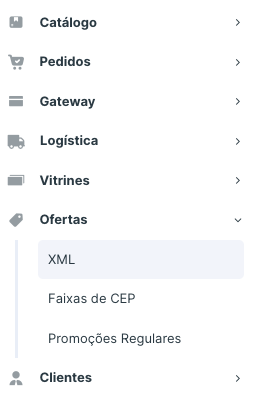
Acesse o menu Ofertas > XML. Clique no botão + para adicionar um novo XML.
Ou na própria busca de pesquisa do console, digite XML.
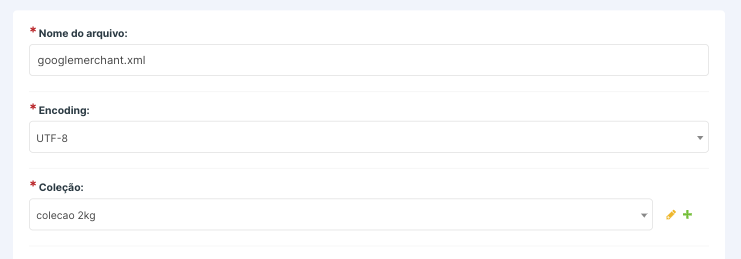
Em "Nome do Arquivo" digite o nome do catálogo, como por exemplo: googleshopping.xml, googlemerchant.xml, etc. (Detalhe: é obrigatório inserir o .xml no nome do arquivo)
No campo Encoding selecione a opção UTF-8.
No campo Coleção selecione a coleção com os produtos para enviar no XML.
Abaixo tem um modelo do código do XML, altere o campo URL_DA_LOJA para seu domínio e copie e cole no campo de XML.
{% load shop_tags i18n l10n %}{% spaceless %}<?xml version="1.0" encoding="utf-8"?>
<rss version="2.0" xmlns:g="http://base.google.com/ns/1.0">
<channel>
<title><![CDATA[{{ shop_settings.SEO_TITLE }}]]></title>
<link><![CDATA[ {{ shop_settings.URL_EMAIL }} ]]> </link>
<description><![CDATA[{{ shop_settings.SEO_DESCRIPTION }}]]></description>
{% for object in object_list|dictsortreversed:"product_id" %}
{% if object.sku.product.category and object.sku.product.images.exists %}
{% get_data_json object.sku.product.specifications as json_specifications %}
<item>
<g:id><![CDATA[{{ object.sku.reference_code }}]]></g:id>
<title><![CDATA[{{ object.product_name }}]]></title>
<description>{% if object.product_detail %}<![CDATA[{{ object.product_detail|safe }}]]>{% else %}<![CDATA[{{ object.product_name|title }}]]>{% endif %}</description>
<g:product_type><![CDATA[{% if object.sku.product.category %}{{ object.sku.product.category.get_root.title }} > {{ object.sku.product.category.parent.title }} > {{ object.sku.product.category.title }}{% else %}Sem categoria{% endif %}]]></g:product_type>
{% localize off %}<link><![CDATA[https://www.URL_DA_LOJA.com.br{{ object.sku.product.get_absolute_url }}{% if object.sku.product.is_variation %}/{{ object.sku.id }}/{% endif %}]]></link>{% endlocalize %}
<g:image_link>{{ object.product_image }}</g:image_link>
<g:condition>new</g:condition>
<g:availability>{% if object.sku.has_stock and object.sku_available %}<![CDATA[in stock]]>{% else %}<![CDATA[out of stock]]>{% endif %}</g:availability>
{% if object.category_global_code %}
<g:google_product_category>{{ object.category_global_code }}</g:google_product_category>
{% endif %}
<g:price>{{ object.sku_unit_price }} BRL</g:price>
<g:sale_price>{{ object.sku_price }} BRL</g:sale_price>
{% if object.sku.ean_13 %}
<g:gtin ><![CDATA[{{ object.sku.ean_13 }}]]></g:gtin>
{% endif %}
<g:brand>{{ object.product_brand_name }}</g:brand>
<g:mpn><![CDATA[{{ object.sku.reference_code }}]]></g:mpn>
<g:identifier_exists>no</g:identifier_exists>
<g:online_only>y</g:online_only>
<g:installment>
<g:months>{{ object.sku_price|get_min_installments }}</g:months>
<g:amount>{{ object.sku_price|get_card_price }} BRL</g:amount>
</g:installment>
{% for s in object.sku.product.property_values.all %}
{% if s.value and s.specification.title|slugify == 'cor' %}
<g:color><![CDATA[{{ s.value }}]]></g:color>
{% elif s.value and s.specification.title|slugify == 'gender' %}
<g:gender><![CDATA[{{ s.value }}]]></g:gender>
{% elif s.value and s.specification.title|slugify == 'age_group' %}
<g:age_group><![CDATA[{{ s.value }}]]></g:age_group>
{% elif s.value and s.specification.title|slugify == 'material' %}
<g:material><![CDATA[{{ s.value }}]]></g:material>
{% elif s.value and s.specification.title|slugify == 'pattern' %}
<g:pattern><![CDATA[{{ s.value }}]]></g:pattern>
{% elif s.value and s.specification.title|slugify == 'is_bundle' %}
<g:is_bundle><![CDATA[{{ s.value }}]]></g:is_bundle>
{% elif s.value and s.specification.title|slugify == 'multipack' %}
<g:multipack><![CDATA[{{ s.value }}]]></g:multipack>
{% elif s.value and s.specification.title|slugify == 'adult' %}
<g:adult><![CDATA[{{ s.value }}]]></g:adult>
{% elif s.value and s.specification.title|slugify == 'tamanho' %}
<g:size><![CDATA[{{ s.value }}]]></g:size>
{% endif %}
{% endfor %}
</item>
{% endif %}
{% endfor %}
</channel>
</rss>{% endspaceless %}
Em seguida, clique em Salvar e Continuar Editando.
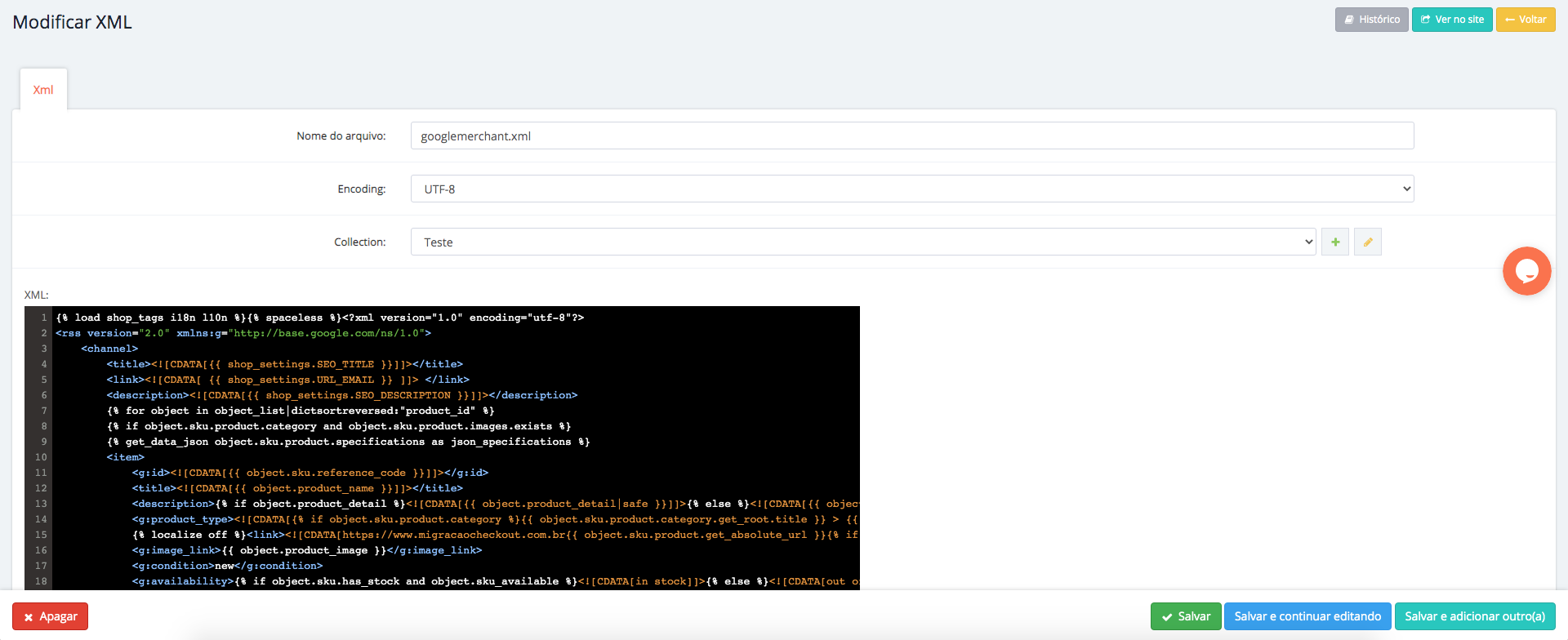
Após salvar, será gerado o XML. Para visualizar o XML e copiar o link, clique no botão "Ver no Site".
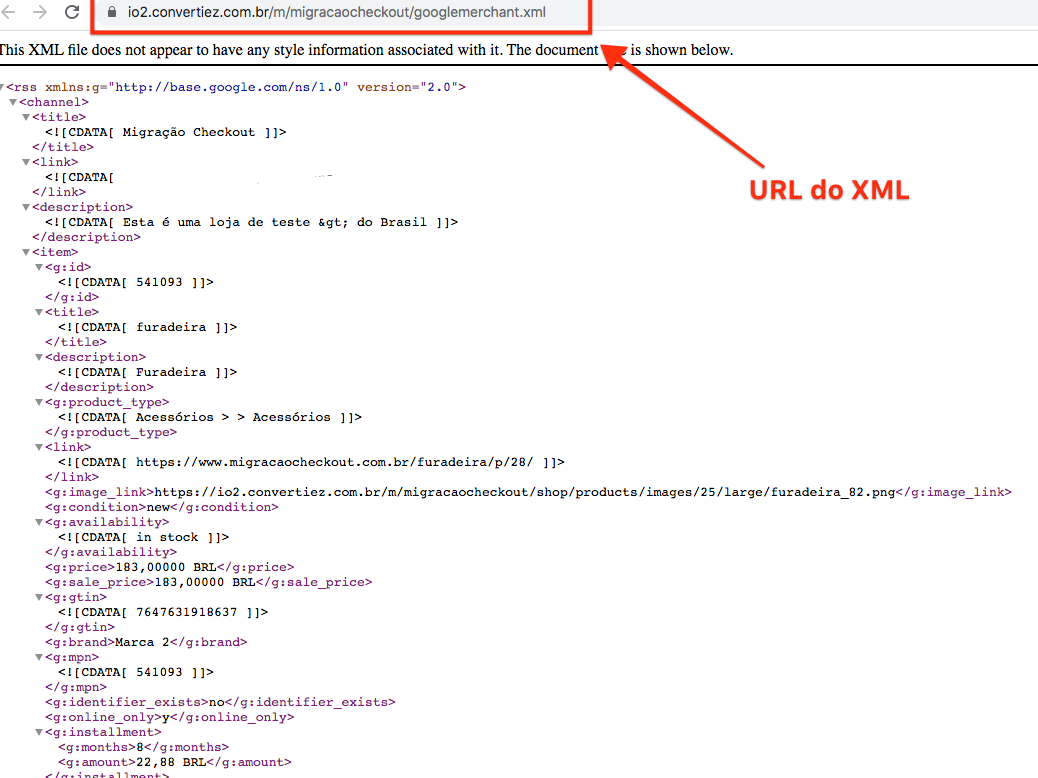
Se preferir troque o domínio, colocando o de sua loja no começo, ele irá funcionar da mesma forma.
Acesse nossos artigos e vídeos para outros tutoriais. Até a próxima!